
1
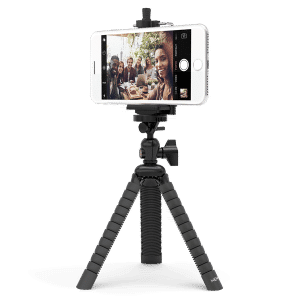
All smartphones currently available can be mounted in the phone mount. However, the phone mount will not accommodate any tablet or minitablet-sized devices. Please note, the phone mount ships fully in its fully closed position and should be opened using the height adjustment dial before mounting larger phones.
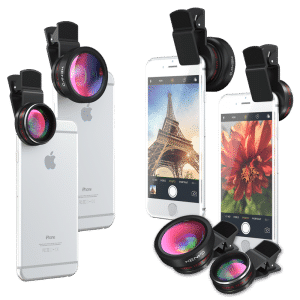
The Xenvo Pro Lens Kit is compatible with most tablets available. As long as the camera on your tablet is less than 1.5 inches from the edge of the device, the Pro Lens Kit will be compatible with it.
The Xenvo Pro Lens Kit is compatible with most dual-camera devices. In order to understand how to use the Xenvo Pro Lens Kit with your dual-camera device, it is helpful to first establish some basics on how dual-camera devices work. Most dual-camera devices, such as the Samsung S9+, Note 9, and all dual-camera iPhones, have one wide-angle camera and one telephoto camera. Generally, the device only uses one of the cameras at a time (although there are some exceptions such as when shooting using 'Portrait Mode') and it will automatically switch between cameras depending on what setting you are using or how zoomed-in you are in the camera app. For example, dual-camera iPhones will switch from the wide-angle lens to the telephoto lens when the camera app is set to "portrait mode" or if you zoom-in to 2x or farther. When using the Xenvo Pro Lens Kit with a dual-camera device that has a wide-angle camera and a telephoto camera, the lens kit should be centered over ONLY the device's wide-angle camera. The lens kit should NOT be centered between the two cameras. On iPhones, the wide-angle camera is the one closer to the corner of the phone. When the Xenvo lens is centered over the phone's wide-angle camera, the telephoto will be blocked by the lens clip. This is perfectly normal and won't interfere with your photography since you will never need the telephoto lens when snapping wide-angle and macro shots with your Xenvo lenses. If you are not sure which of your phone's camera is the wide-angle camera, you can figure it out with this simple test. Set your camera app to its normal photo mode and make sure the zoom is set to 1x. Now, cover only one of the cameras with your finger. Whichever camera causes the screen to go black with these settings is the wide-angle camera and that is the one you need to center the Xenvo lens over.
The Xenvo Pro Lens Kit's lenses can be clipped over your phone's protective case. We have found that the Xenvo Pro Lens Kit is compatible with most of the phone cases we have tested. But please keep in mind that the Xenvo lens kit has not been tested with EVERY make and model of phone case due to the huge variety of phone cases available today. One thing to be aware of, if you use a thick phone case, you may experience slight vignetting. Vignetting is darkening around the corners or edges of your photos. This can be prevented by using a thinner case or taking your phone out of its case while snapping photos. Additionally, on phones that have the camera placed farther from the edge, a case that adds extra distance between the edge of the phone and the camera may prevent the lens clip from reaching the camera. As long as the distance from the edge of your phone case to the center of your camera is less than 1.5 inches, it will reach.
The Xenvo Pro Lens Kit can be used with most laptop cameras. As long as the camera is within 1.5 inches of the edge of the laptop and is less than 3/4 inch thick, the lens clip will be able to reach the camera.
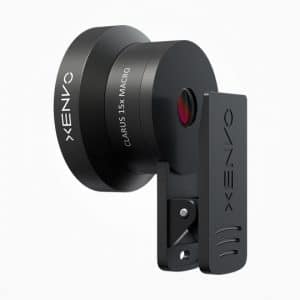
In order to attach the Xenvo lens to your device, you must first screw the macro lens into the lens clip. If you wish to use the wide-angle lens, screw the wide-angle lens onto the front of the macro lens. Once the lens is attached to the lens clip, simply secure the clip to the phone, taking care to center the lens over your phone's camera. It can be helpful to look at your device's camera through the front of the lens in order to center the lens over the camera as precisely as possible. We have added a crosshair to the circular base of the lens clip to aid in getting the lens quickly and accurately aligned.
By keeping both lenses attached to the lens clip, you can fit the lenses, lens clip, LED light, cleaning cloth, and charging cable in the carrying case all at the same time.
No, the lens clip will not damage or scratch your phone or its screen. The gripping surfaces of the lens clip are covered with soft, grippy rubber pads that will hold the lens securely in place without causing any damage to your phone or its screen. The pressure exerted on the phone by the lens clip is enough to hold the lens in place, but not so much as to cause any damage to your device.
The Xenvo Pro Lens Kit is not meant for zooming in on distant subjects. The wide-angle lens gives you a wider, more "zoomed-out" view. The macro lens allows you to take much closer photos of small, nearby subjects. If you are interested in achieving a more "zoomed-in" view on distant subjects, you may want to investigate telephoto lenses for your device.
Yes, the Xenvo Pro Lens Kit works just the same when recording videos as it does when shooting still photos. Depending on the microphone placement on the particular phone you are using, the lens clip may interfere with clear audio recording while shooting video.