
1
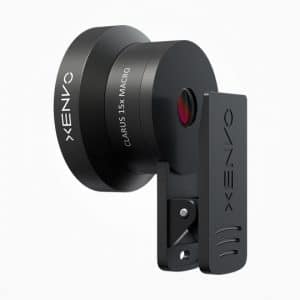
Yes, the Xenvo Pro Lens Kit is great for taking selfies and it works with both the front and rear-facing cameras of most devices.
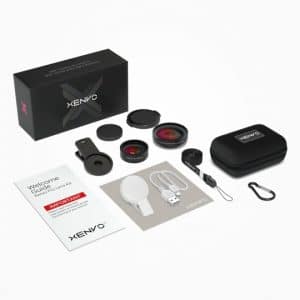
The Xenvo Pro Lens Kit includes the wide-angle lens, macro lens, lens clip, GlowClip LED light, LED light charging cable, lens cleaning cloth, lanyard with quick-release head, travel case, and a VIP card with access to video tutorials as well as the Xenvo Lifetime Warranty registration.
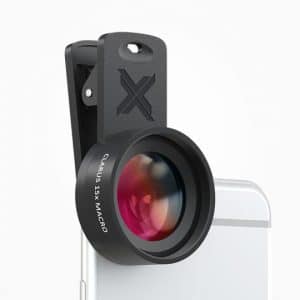
Generally speaking, macro photography refers to extreme close-up photography of very small subjects. Definitions and approaches to macro photography have changed significantly as a result of the digital revolution and today, a macro photograph can be considered a photo where the vertical height of the subject is 24mm (roughly 1 inch) or less.
The most common mistake when using the macro lens is positioning the camera too far away from the subject. Ideally, the macro lens should be about 1/2 inch to 2 inches (~1cm-5cm) away from the subject of the photograph. The macro lens allows your camera to focus on subjects that are much closer and, as a result, it can't properly focus on distant subjects. Also, because the macro lens magnifies your subject significantly, it will pick up slight hand movements which can cause motion blur in photographs. This makes keeping the camera stable especially important when using the macro lens. Using a tripod can be very helpful toward this goal, but great results can still be achieved by holding your hands extra steady while shooting with the macro lens.
The 15x of the macro lens refers to the lens's "magnification factor". You could think of it sort of like a 15x magnifying glass for your phone's camera. The macro lens allows you to place your camera extremely close to a subject to capture super-detailed photographs. It is important to recognize that the 15x magnification factor is different than a 15x zoom or telephoto. The macro lens is not for photographing distant objects and will not focus properly on subjects more than about 3 inches from the lens.

The Xenvo Pro Lens Kit includes a USB cable for charging the LED light. The cable plugs into the base of the LED light between the legs of the clip. By pinching open the legs of the clip, the USB cable can be plugged into the LED light and the other end can be plugged into a computer or charging block with a USB port. The GlowClip LED light will glow red while the battery is charging and the red light will turn off once it is fully charged.
Blurry edges are often the result of the Xenvo lens not being accurately centered over the device's camera. By carefully positioning the Xenvo lens so that your device's camera is precisely in the center of the Xenvo lens, you can often greatly reduce or eliminate edge blurriness. Looking at the camera through the front of the Xenvo lens while you are positioning it on your device makes it easier to see when the Xenvo lens is properly centered. We have added a subtle crosshair to the circular base of the lens clip to aid in quickly and accurately centering the lens over your phone's camera.
The wide-angle lens gives you a significantly wider angle-of-view. This means that if you keep your camera in one place and take two pictures, one with the wide-angle lens and one without it, the picture taken with the wide-angle lens will include parts of the scene that were outside of the frame of the picture taken without the wide-angle lens. Another way to say this is that the wide-angle lens will give you a more "zoomed-out" view. Depending on what you are photographing, this effect may be more or less obvious. If, for example, you are at a restaurant with a group of friends and want to take a picture without leaving your seat, the difference provided by the wide-angle lens will be very noticeable because you will be able to include more people and more of the table in your photo. However, if you are taking a photo of trees outside, you may not notice as much of a difference because how much of a repeating pattern like leaves and branches are included are not as obvious to our eyes as how many faces are in a picture. Also, in that scenario, it would be easier to position your camera farther from the tree to include more of it in the picture, which would have a similar effect to using the wide-angle lens.
In the context of the wide-angle lens, 0.45x is what is called a crop-factor. While this is a somewhat complex technical concept in photography, what it means in practice can be fairly easily understood by considering its relationship to the zoom function in your device's camera app. When you are all the way "zoomed-out" on your device, you are at 1x, the widest field-of-view available. You can then "zoom-in" to 2x and beyond. By clipping the Xenvo wide-angle lens onto your device's camera, you are essentially achieving an even more "zoomed-out" view that is equivalent to 0.45x. The difference between 0.45x and 1x is slightly more than the difference between 1x and 2x.
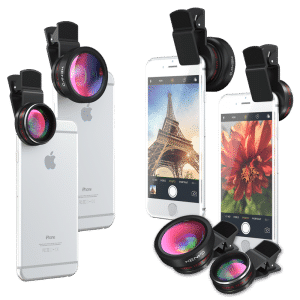
Due to the huge and ever-growing variety of phone models available, it is not possible to maintain a comprehensive list of compatible devices. However, the Pro Lens Kit is compatible with nearly all single-camera phones. As long as the camera on your single-camera phone is within 1.5" of the edge of your phone, it will be compatible. The Pro Lens Kit is also compatible with the most popular dual-camera phone models such as the Samsung Galaxy S9+ and Note phones as well as all current iPhones. The Pro Lens Kit is not compatible with some of the triple-camera phones available from Huawei such as the P20 Pro One way you can test whether or not the Pro Lens Kit will work with your multi-camera phone is to cover the cameras individually with your finger while the camera is in the normal photo setting and zoomed all the way out (1x). You should be able to figure out which camera the phone is "looking through" by seeing which camera being covered causes the screen to go dark. As long as the camera app still works and allows you to take a photo when the cameras other than the main camera are covered, the Xenvo lens should work with your phone.